Holy Quran: 16 Lines Per Page
- 3.9
- Rating
- 500.00K
- Installs
- Free
- Price

 Analysis by App-foxy
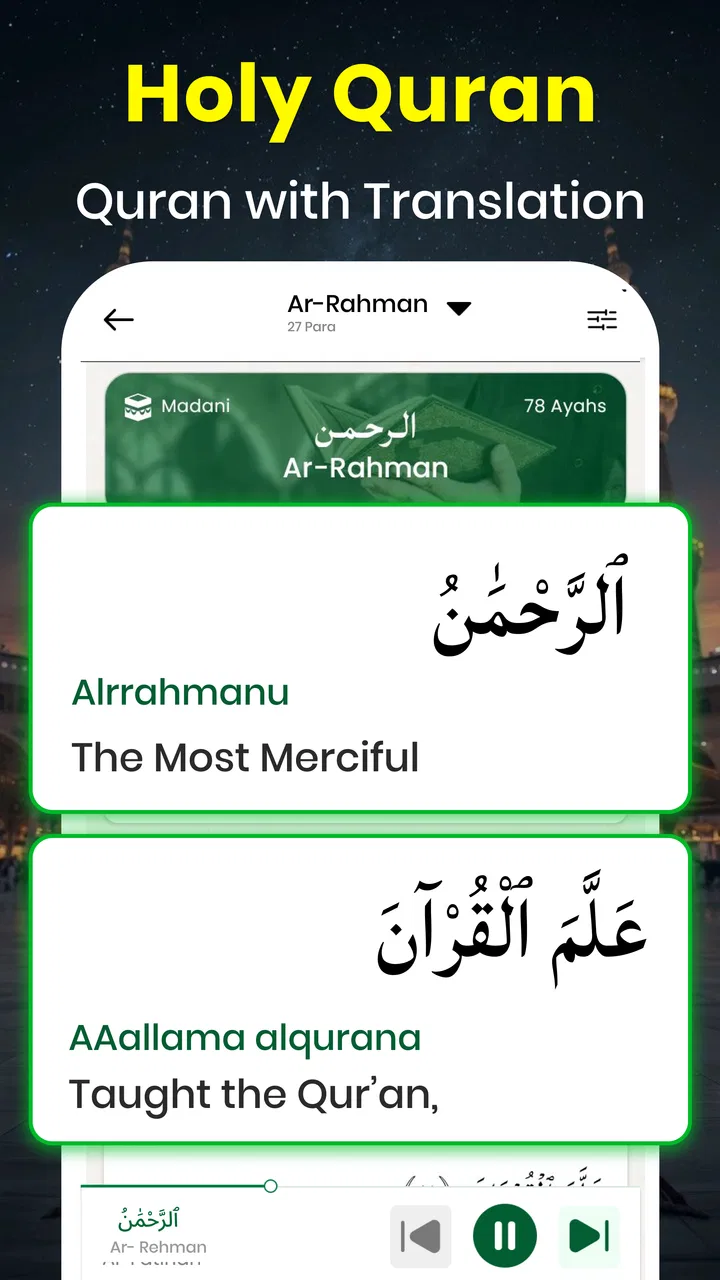
I found Holy Quran: 16 Lines Per Page most interesting when I stopped treating it as just another reading app and looked at how it fits into ordinary phone use. Its focus is clear: a Quran-reading experience alongside translation tools, Qibla direction, and a Ramadan calendar. That combination makes it more useful than a bare digital text for someone who wants several faith-related references in one place, although the quality of the experience depends heavily on how and where you use it.
The app comes from Translator Kingdom and sits in the libraries and demonstration section of the Android store. It is free to install, available for Everyone, and runs on devices using Android 7.0 or later. I would describe it as a practical companion rather than a complete replacement for every dedicated Quran, prayer, or Islamic calendar tool. Its appeal is the way its main elements sit together, especially for quick reading or checking something while away from home.
How connectivity changes the reading experience
I find connectivity matters most when a reading session turns into a practical task: moving from a passage to its translation, then checking direction or the Ramadan calendar. Before relying on that sequence away from home, I’d try each step on the connection I expect to have and note which information I need ready in advance. That small rehearsal makes it easier to tell whether the app fits your routine or whether a separate, more dependable reference is the better handoff.
You May Also Like

 AccuWeather: Weather Radar
AccuWeather Review: A Quick, Clear Forecast for Everyday Decisions
For everyday plans, the best forecast is the one you can understand quickly. AccuWeather makes rain timing, radar, and local conditions easy to act on, with a few trade-offs.

 Hill Climb Racing
Why Hill Climb Racing Still Turns Crashes Into One More Run
A tiny car, a bumpy hill and one more upgrade: Hill Climb Racing keeps resurfacing because its simple chaos makes every near-miss feel personal.

 AliExpress - Shopping App
AliExpress Makes Global Shopping Feel Personal, but Shoppers Bear the Risk
AliExpress turns a global marketplace into a pocket-sized discovery engine. Its reach is useful, its shopping loop compelling, and its trade-offs easy to miss.

 Lords Mobile: Kingdom Wars
Lords Mobile Is a Kingdom-Building Routine, Not a Quick Match
A case-by-case verdict on the building, battles, device demands, and social commitments that make Lords Mobile rewarding for some players and exhausting for others.

 PDF Scanner app - TapScanner
TapScanner Makes Paperwork Easier to Capture, Check, and Share
TapScanner makes scanning with a phone feel less like a rescue operation and more like a dependable step in getting work done. Its capture tools are useful, though not flawless.

 Block Blast!
 Shows How Much a Puzzle Game Can Leave Out
A quiet grid game shows why puzzle players increasingly value instant clarity, repeatable skill and low-pressure play—and where the genre still needs to catch up.
More From Our News Desk
View All News


Useful moments when the phone is connected
The most natural use is a short reading session while the phone is already online. You may open the Quran, move through the pages, check a translation, then switch to the Qibla direction or Ramadan calendar without changing apps. That flow is valuable because it keeps a simple question from turning into a search through several unrelated tools.
I would especially recommend trying the app before an important trip, prayer appointment, or Ramadan routine begins. Open each area you expect to use, become familiar with the controls, and learn where the reading, translation, direction, and calendar sections are located. This small preparation matters because a tool that feels obvious at home may feel less convenient when you are standing outside, carrying bags, or working with a weak signal.
The app’s store summary highlights translations, Qibla direction, and the Ramadan calendar for 2026. Those additions change the role of the reader. Instead of opening it only for a long, quiet session, you can use it as a reference point during the day. I found that particularly helpful when I wanted to read a passage and then understand it in a broader daily context rather than opening separate services for every task.
There is also a practical benefit to having a familiar interface for repeated routines. If you use the same phone each morning, you can build a habit around opening the reading area first, then checking the relevant supporting feature. That is less about speed than reducing interruptions. The fewer app switches involved, the easier it is to keep a short session focused.
What a network connection can change
Connectivity becomes important whenever the app needs to obtain or refresh information. I would not assume that every part of the experience behaves identically without a connection. A reader should test the precise pages and tools they depend on before leaving reliable coverage, rather than discovering at the roadside or during travel that a section behaves differently.
This is most relevant to the supporting tools. A Qibla feature may be more sensitive to the phone’s current context than a static reading page, while a calendar can be useful only if its displayed information is available when you need it. I am deliberately careful here: the sensible approach is to treat network availability as part of the setup, not as something to think about only after a feature fails.
For a connected session, I would keep the app open long enough to confirm that the selected translation and supporting screens load properly. If you are preparing for travel, check them in the same kind of conditions you expect to face. A home Wi-Fi test is helpful, but it does not tell you how the app will feel with mobile data, a crowded public network, or an intermittent signal.
My main practical advice is to test the exact routine, not just the installation. Reading a page, opening a translation, checking direction, and viewing the calendar are separate actions. A successful launch tells you very little about how dependable your preferred workflow will be in a low-connectivity situation.
Reading on the move
The sixteen-line page format gives the reading experience a recognizable structure. That can make it easier to remember where you were, especially if you move between the phone and a printed copy or another familiar layout. I like this more than a continuously scrolling text view when I want to read in short portions, because a page provides a clear stopping point.
On a phone, however, page-based reading has a trade-off. The screen is smaller than a printed Quran, so you may need to adjust your grip, zoom, or viewing position depending on the device. That is not a flaw unique to this app, but it affects whether the sixteen-line presentation feels comfortable. Someone with a large display may find it pleasant, while a compact phone could make longer sessions tiring.
Mobile use also changes the kind of reading the app supports. I see it working best for a commute break, a waiting room, a quiet moment at work, or a brief evening session. It is less convincing as the only reading solution for someone who prefers a large screen, physical pages, or a highly specialized study environment.
One useful habit is to choose a stopping point before you begin. Rather than opening the app without a plan and becoming distracted by the phone itself, decide whether you are reading a page, reviewing a passage with translation, or checking a practical tool. This makes the app feel more like a purposeful companion and less like another notification-heavy screen.
Qibla checks outside the home
The Qibla direction feature is the part most likely to be used in changing surroundings. At home, you may only need to establish direction once. In a hotel, office, airport, or unfamiliar neighborhood, the feature becomes more relevant, but the phone’s position and the surrounding environment still matter. I would hold the device steadily, follow the on-screen guidance carefully, and avoid treating a single quick reading as infallible.
This is also where connectivity and phone context meet. Even if the app opens, the direction tool may not be equally convenient in every place. Before relying on it during travel, I would practice using it at home and compare the result with the direction you already know. That is not about distrusting the app; it is about learning how your particular phone behaves when you rotate it, move indoors, or use it near other objects.
The feature is a welcome addition for a reader app, but it should not be confused with a full navigation system. If your priority is advanced location handling, detailed prayer calculations, or extensive adjustment controls, a dedicated Islamic utility may suit you better. Holy Quran: 16 Lines Per Page is more appealing when Qibla is one part of a broader reading routine.
Ramadan planning and changing information
The Ramadan calendar for 2026 gives the app a time-sensitive purpose. I would use it as a convenient reference inside the same place where I read, but I would still pay attention to local practice and the context in which dates are followed. Calendar information can be especially important when travel, location, or community arrangements affect how a person plans the day.
From a connectivity perspective, this is exactly the kind of tool worth checking in advance. Do not wait until the moment you need a date or schedule to discover how the calendar section loads on your device. Open it while connected, understand what it displays, and make a personal note of the information you rely on most. That simple step reduces the pressure of using a phone as the only reference during a busy day.
I also would not use a calendar screen as a substitute for every local announcement or personal religious guidance. Its value is convenience: it places a useful reference next to the Quran and translation. Its limitation is that a general app cannot automatically represent every local circumstance in the same way a trusted community source can.
When things go wrong
The most frustrating failure would be opening the app at the exact moment you need it and finding that a supporting section does not respond as expected. The best response is to separate the problem into small checks. First, see whether the phone has a usable connection. Then close and reopen the relevant area, confirm that the device itself is responsive, and try the reading section separately from the Qibla or calendar tool.
This matters because a problem with one feature does not necessarily mean the entire app is unusable. If the reading page works but a supporting tool does not, you may still be able to continue reading and return to the other feature later. That is a more realistic way to use a multi-purpose app than abandoning the whole experience after one interruption.
For travel, I would prepare a fallback that does not depend on a last-minute connection. That might mean carrying a printed reference, remembering the direction from a trusted source, or keeping the information you personally need available elsewhere on the phone. I am not claiming that the app provides offline access; I am saying that a connectivity-sensitive routine should never be your only plan when the situation is important.
Another recovery habit is to avoid repeatedly tapping a feature when the phone is struggling. Repeated attempts can make the interface feel frozen even when the underlying issue is temporary. Give the app a moment, check the connection, and reopen the specific section instead of rapidly switching between screens. This is a small technique, but it makes mobile tools feel much less stressful.
Using it without wasting mobile data
Because the app combines reading with other reference features, I would be deliberate about when I use mobile data. Connect through a trusted Wi-Fi network when setting up a routine, checking the calendar, or exploring translations for the first time. Once you know how the app behaves, reserve mobile data for the moments when you genuinely need access away from home.
I would also avoid repeatedly opening and closing the app simply to browse. Decide what you want to do before launching it: read, compare a translation, check direction, or consult the calendar. This reduces unnecessary loading and helps preserve battery as well as data. The habit is particularly useful on older phones, where frequent switching can make the overall experience feel slower.
Travelers should be more cautious. Roaming conditions can make casual app use less predictable, so I would test the application before departure and avoid assuming that a familiar home routine will behave identically abroad. If the reading experience is central to your trip, create a backup plan that matches your own needs instead of relying on an untested connection.
There is also a privacy-minded reason to keep usage intentional. I prefer opening only the feature I need and leaving the app when I am finished, especially on a shared or borrowed device. That keeps the session simple and reduces the chance of accidentally exposing personal reading habits or leaving a practical tool open for someone else to use.
Who will appreciate this combination
I think this app is a good fit for someone who wants a straightforward Quran reader with a few closely related tools in the same package. It suits a person who reads in short sessions, checks translations while reading, and occasionally needs Qibla direction or a Ramadan reference. The free entry point also makes it easy to try without committing to a paid download.
It may be particularly useful for a new smartphone user who would rather learn one modest app than assemble several specialized ones. The Everyone content rating makes it suitable for a broad audience, although comfort still depends on the reader’s screen, eyesight, and preferred reading style.
I would be less enthusiastic about recommending it as the sole choice for advanced students, people who need extensive scholarly resources, or readers who demand a highly refined offline workflow. A dedicated Quran app may offer a deeper study environment, while a specialized Qibla or prayer application may provide more detailed controls. The strength here is convenience across a few related tasks, not maximum depth in every category.
Version, cost, and overall polish
The current release is version 2.1, and the app has passed one hundred thousand installs. Its average score is 3.7 from around 3.3 thousand ratings, which suggests a mixed but meaningful user response rather than universal approval. I read that as a reason to approach it with practical expectations: the concept is useful, but individual comfort with the interface and connectivity behavior will matter.
There are in-app purchases ranging from $0.99 to $28.99 per item. Since the app itself is free, I would install it first and spend time with the core reading and reference workflow before considering any purchase. That is especially important for a utility whose value depends on whether the layout, translation access, and supporting tools match your personal routine.
The release date is December 29, 2025, so the Ramadan calendar focus is timely for the current cycle. I would still keep the application updated through the normal store process and revisit the calendar when the relevant period approaches. A time-sensitive feature deserves a quick check before it becomes part of a daily schedule.
My final view is positive but measured. Translator Kingdom has brought together a useful set of functions in a free Android app, and the sixteen-line presentation gives the Quran reader a clear identity. The experience is strongest when you are connected, know what you want to do, and treat the app as a compact companion rather than an all-purpose religious reference.
If your priority is convenient reading with translation, occasional Qibla checks, and a Ramadan calendar in one place, I think it is worth trying. If you need guaranteed access in every situation, extensive study features, or a fully specialized tool for each task, I would compare it with dedicated alternatives first. For everyday mobile use, its best quality is practical concentration: several relevant tools, one familiar starting point, and a workflow that becomes more dependable when you prepare for connectivity limits instead of ignoring them.
FAQs for Holy Quran: 16 Lines Per Page
01What is the main feature of the Holy Quran: 16 Lines Per Page app?
The Holy Quran: 16 Lines Per Page app is designed for users who prefer reading the Quran in a traditional 16-line format, similar to that found in many printed versions. This feature is particularly beneficial for those who are accustomed to this layout, making it easier to follow along and memorize the text.
02Is the Holy Quran: 16 Lines Per Page app available offline?
Yes, the app is fully functional offline. Once downloaded, users can access the entire Quran without an internet connection. This ensures that you can read and refer to the Quran anytime and anywhere, making it perfect for travel or locations with limited connectivity.
03Does the app offer translations in other languages?
The Holy Quran: 16 Lines Per Page app provides translations in multiple languages, catering to a diverse user base. This feature allows non-Arabic speakers to understand the meaning of the verses, enhancing their reading and learning experience. Users can typically choose their preferred language from the settings menu.
04Are there any in-app purchases or ads in the Holy Quran app?
The app is generally free to download, but it may contain optional in-app purchases to unlock premium features. These could include additional translations or audio recitations. Additionally, while some apps maintain an ad-free experience, others might display ads to support the developers, so checking the app description is recommended.
05What accessibility features does the Holy Quran app offer?
The app is designed with accessibility in mind, offering features such as adjustable text size, night mode, and audio recitation options. These ensure users can customize their reading experience to suit their needs, making the app user-friendly for people with varying visual and auditory preferences.
Pros
- User-friendly interface for easy navigation.
- High-quality Arabic script for clear reading.
- Bookmark feature for quick access to verses.
- Audio recitation available for better understanding.
- Search function to find specific surahs quickly.
Cons
- Lacks offline access for audio recitations.
- Limited customization of text size and font.
- Ads may interrupt the reading experience.
- Requires internet for full functionality.
- No translation options for non-Arabic speakers.

Holy Quran: 16 Lines Per Page
Gallery